Use A Data Recovery For Your Important Data
Read Time:2 Minute, 7 Second
Data recovery software is often the easiest and most affordable way to retrieve lost files. However, sometimes software alone may not be enough. If the memory card is physically damaged or unreadable by a card reader, professional data recovery services may be required. These specialized services have advanced tools and expertise to recover files from severely damaged storage devices.
When to Consider Professional Data Recovery
While software can handle minor data loss issues, there are instances where professional intervention is necessary:
Corrupt File System: If your card displays errors such as “card needs to be formatted” or “file system corrupted,” professional tools may be needed.
Physically Damaged Cards: If your memory card is bent, cracked, or has water damage, software recovery is unlikely to work.
Unrecognized Cards: When your computer or device fails to detect the memory card, it could indicate deeper issues.
How Data Recovery Services Work
1. Assessment and Quote
Most data recovery companies offer a free initial assessment. You send them your damaged card, and they evaluate the possibility of recovering your files before providing a cost estimate.
2. Advanced Recovery Techniques
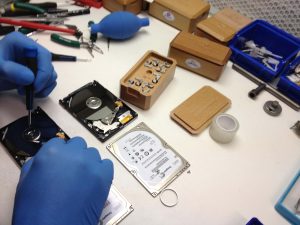
Experts use specialized equipment to extract data, even from severely damaged storage devices. They may open the card in a cleanroom environment to access internal components if necessary.
3. File Retrieval and Return
Once the data is recovered, the company will transfer the retrieved files to a new storage device and send them back to you. Some companies offer secure online delivery of your files.
Where to Find Data Recovery Services
- Specialized Data Recovery Companies: Reputable services like DriveSavers, Ontrack, and SalvageData specialize in recovering lost files from various storage devices.
- Local Electronics Stores: Some electronics repair shops and computer service centers offer in-store data recovery services.
- Mail-in Services: Many recovery providers allow you to ship your damaged card for evaluation and recovery.
Choosing the Right Data Recovery Option
Software Recovery (Best for minor issues)
- Affordable and easy to use
- Works for accidental deletion and minor corruption
- Recommended tools: Recuva, EaseUS Data Recovery Wizard, Stellar Photo Recovery
Professional Recovery Services (Best for major issues)
- Suitable for physically damaged or corrupted cards
- Experts use advanced tools to retrieve lost data
- Can recover files even when the card is unreadable
Conclusion
If you’ve lost important files from your memory card, data recovery software is a good first step. However, if the issue is more severe, a professional recovery service may be necessary. Investing in a reliable recovery solution can help restore your valuable data and prevent permanent loss.


Happy
0 %

Sad
0 %

Excited
0 %

Sleepy
0 %

Angry
0 %

Surprise
0 %
 0
0
 0
0